
AI writing help
Have AI write a defect from your note or a photo, rewrite wording for the homeowner, and draft the report's opening summary.
AI can help you write faster in the report writer, but it never changes a report on its own. Every suggestion is shown to you first, marked not saved, and you decide whether to use it. AI only works from what you gave it (your note, the photo, the defects you recorded); it doesn't invent findings.
Each use costs AI credits from your plan's monthly allowance, shown next to the button (for example 1 credit). If you run out, the screen says so with a Buy more link.
Write a defect from your note
Describe what you saw
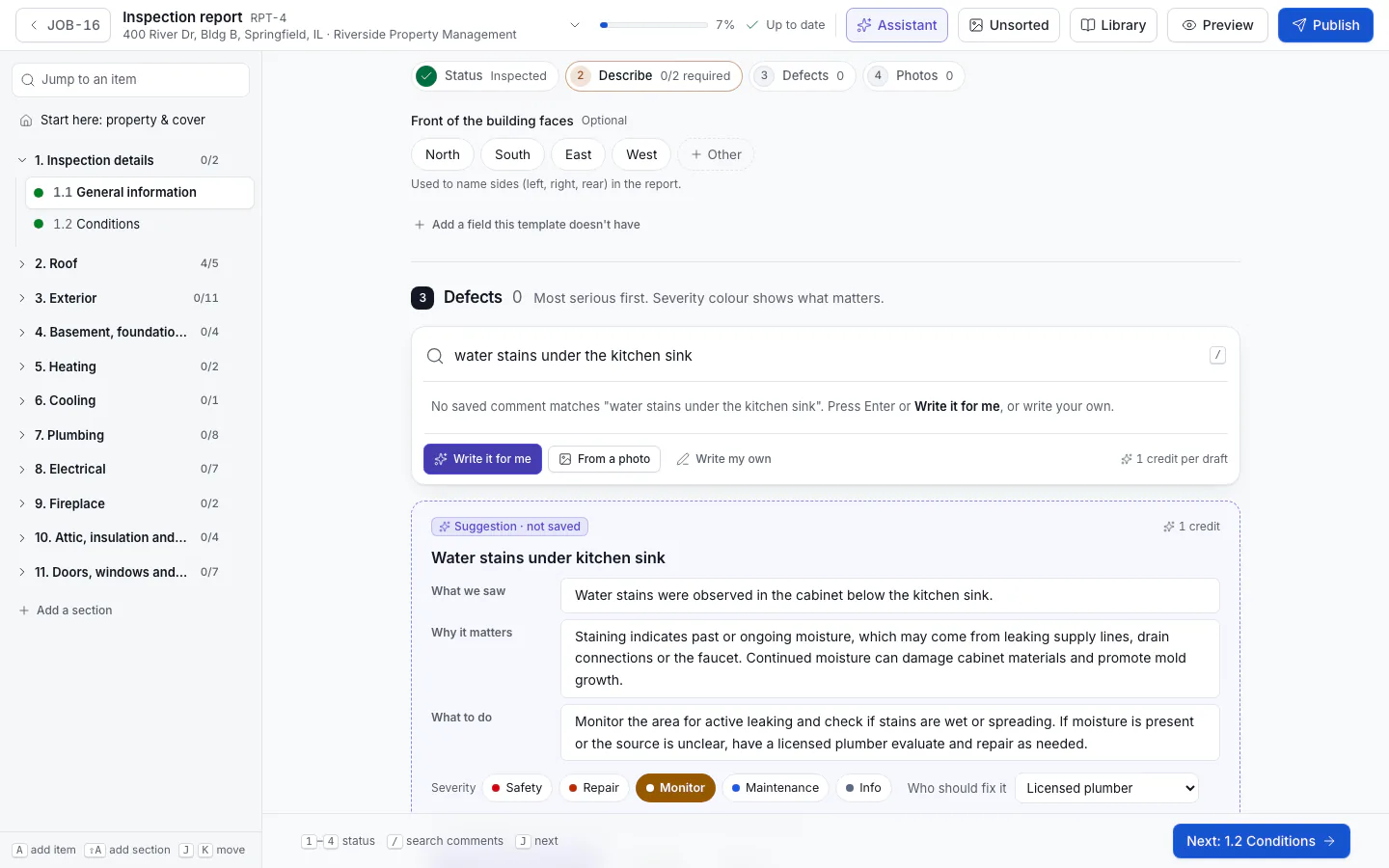
On an item's Defects step, type a few words in the comment search, for example "water stains under the kitchen sink".
Click Write it for me
AI writes a Defect title, What we saw, Why it matters, What to do, a Severity and Who should fix it. It says what it was based on, and when it's close to one of your library comments it tells you.
Check it and accept
Edit anything, then click Accept defect (or press ⌘+Enter, Ctrl+Enter on Windows). Try again writes another draft; Discard throws it away.
From a photo
Click From a photo in the same place and Pick a job photo or Upload a photo. AI looks at the photo (and your note, if you typed one) and writes the defect the same way.
Rewrite wording
On any defect, open Rewrite (Rewrite with AI · 1 credit) and choose Clearer, For the homeowner or Shorter. Compare the result, then click Use this or Keep original.
Draft the summary
On the report's overview, the Summary is a short opening paragraph on the most important issues. Click Draft a summary: AI writes it only from the defects you recorded, most serious first. Click Use this summary to keep it (you can Edit it afterwards), Draft again, or Discard. Prefer your own words? Click Write my own.
Draft template comments
Owners and admins can also have AI draft comments for the comment library from a few words.
AI-assisted marking
Wording you accepted from AI is marked AI-assisted in the writer, and the client sees "AI-assisted" next to it on the report page and in the PDF. You stay responsible for what the report says: read every suggestion before you accept it.
If AI writing isn't available, the writer says so and you can still write everything yourself. The summary then falls back to a plain list built from your defects.
Related
Photos and markup
Add photos to items and defects, choose the cover, file photos taken on the phone, and draw arrows and circles on them in the colour of each defect's severity.
Inspection assistant
Talk, type or send photos as you walk the property; the assistant files your notes into the report as proposals you accept.