
Agreements
Write the agreement clients sign before their report is released, send it to sign online, or have them sign on your device or phone.
Agreements are optional. You need one when a release rule waits for a signed agreement, as many inspectors' do: the client reads and signs your pre-inspection agreement, and the report opens once it's signed (and paid, if your rule says so).
Write your agreement
Owners and admins manage agreement wording.
Open Agreements
Go to Settings → Report templates and click the Agreements tab. With none yet, ServFlo starts you off with sample wording.
Create it
Click New agreement. Give it a Name (for example "Pre-inspection agreement") and write the Wording. Write {business} where your business name should appear.
Say where it's used
Turn on Default agreement to use it for every service type without its own, or pick Service types for this one. Click Add agreement.
The sample wording is a starting point, not legal advice. Have your own agreement checked for your state.
Changing the wording later doesn't change agreements already sent or signed: each keeps the exact wording the client saw. Archive an agreement to stop sending it to new jobs.
Send it to the client to sign
Open the job
On the job, find Agreement in the Report sharing panel. It shows Not sent, Waiting or Signed.
Send it
Click Send to sign, check which Agreement to use (The default for this service, or another), and send. The client gets a link by email and text to read and sign it.
You can also Copy signing link to send it yourself, Resend it, or Withdraw agreement while it's still waiting. A signed agreement can't be withdrawn.
When the release rule needs a signature, the client's report page also offers Sign the agreement, so they can sign from the report link too.
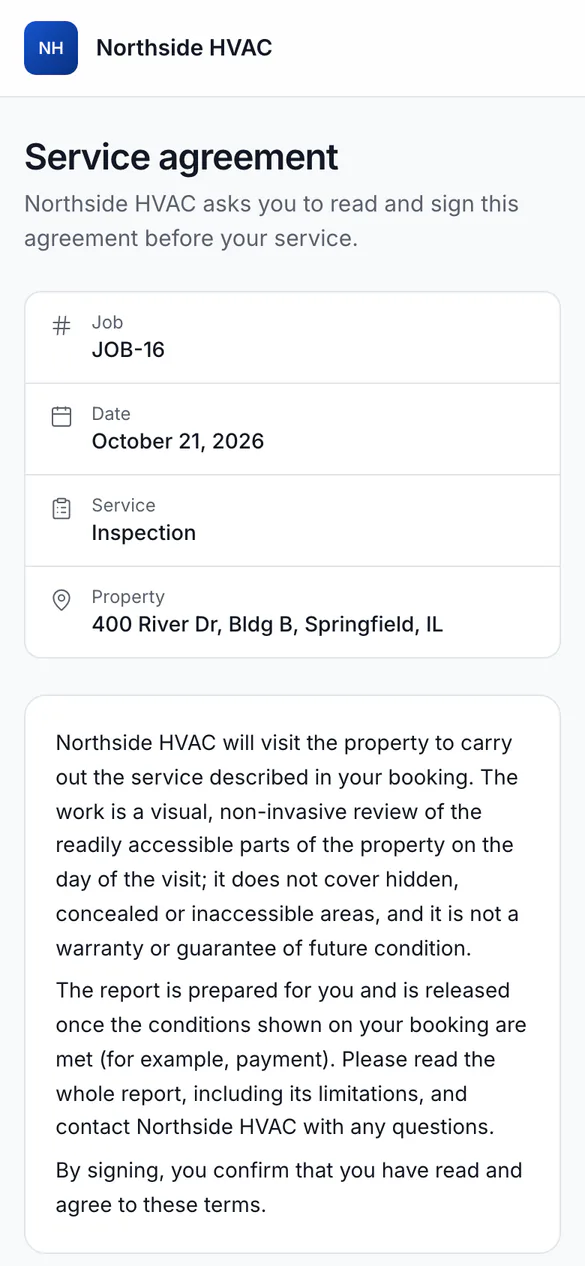
What the client does
The client opens the link, reads the agreement, types Your full name, ticks I have read and agree to this agreement., optionally draws a signature, and clicks Sign the agreement. Their name, the time, their IP address and browser are kept with the exact wording.
Have the client sign on site
On a computer or tablet at the job, click Sign on this device. Hand it to the client to read, type their name (Client's full name) and sign, then click Record signature. The agreement shows Signed on site.
In the mobile app, open Agreement from the job or the report and tap Client signs here. This works without signal: the signature goes to ServFlo when you're back online. If the wording changed in the meantime, the app asks the client to sign the current wording again.
After it's signed
The job shows Signed by the client and when. ServFlo checks the job's reports straight away: a report that was only waiting for the signature opens, and the client is sent the link.