
Quotes on site
Build a good / better / best quote from the pricebook on your phone, have the customer approve and sign, and sell memberships.
When your business lets technicians quote, you can build a quote at the customer's home, let them pick an option and sign, and take a deposit, all without signal.
An owner or admin turns this on in Settings → Team members, under Technicians on site: Technicians can create quotes. Technicians quote only on their own jobs, at pricebook prices, with no custom prices or discounts. The office schedules the work.
Create a quote
Open a new quote
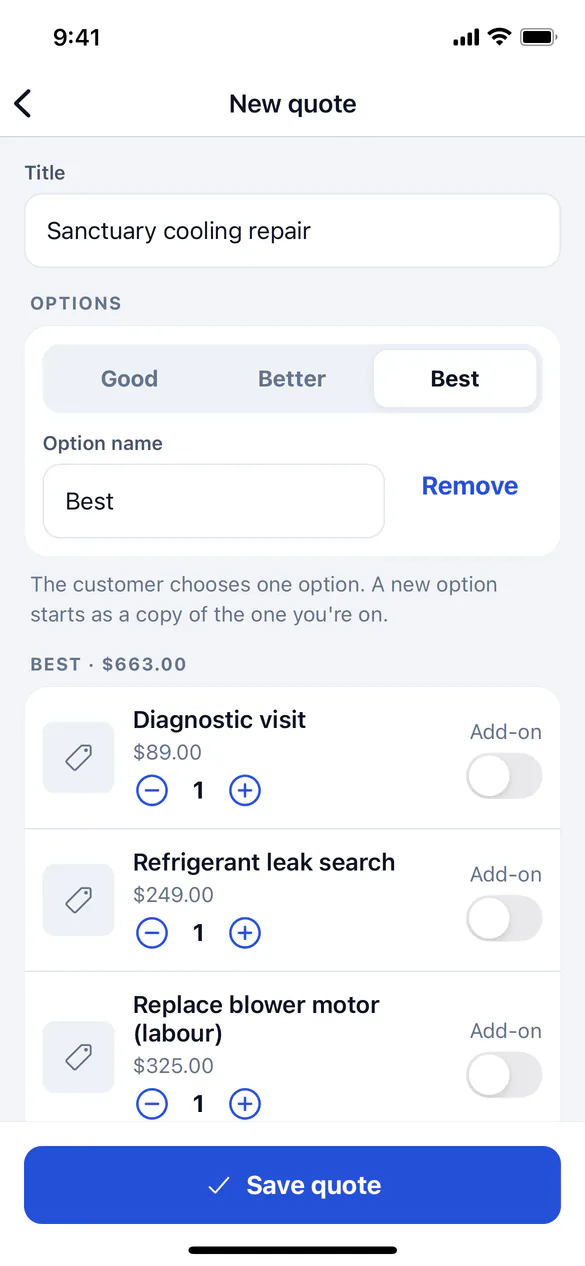
On the job, under Wrap-up, tap Create a quote. Give it a Title.
Add items
Search the Pricebook and tap items to add them. Use the minus and plus buttons to change quantities. Switch on Add-on for extras the customer may leave out.
Offer options (optional)
Tap Add option to offer good / better / best. A new option starts as a copy of the one you're on, so you only change what's different. The customer chooses one option.
Get the customer's approval (optional)
Under Customer approval (optional), mark the option and add-ons the customer chose, tap Customer signs to approve and hand them the phone. They read the terms, type their name and sign to approve the total shown.
Take a deposit (optional)
After approval, enter the amount in Deposit received and choose Cash or Check.
Save
Tap Save approved quote (or Save quote if the customer hasn't approved yet). It reaches ServFlo as soon as the phone has signal.
ServFlo adds tax and any member discount when the quote is saved.
Present options in the sales presenter
On Grow and Pro, tap Present options under Wrap-up to walk the customer through good / better / best on a tablet. Pick the quote to present; it opens in the browser and needs signal. See Sales presenter.
Sell a membership
When your business offers membership plans and the customer isn't a member yet, tap Sell a membership under Wrap-up.
Let the customer choose
Hand them the phone. Each plan shows its price, term, included visits and discounts. They tap the plan they want.
Sign
Tap Customer signs the agreement. The customer reads the terms, types their name and signs.
Sign them up
Tap Sign them up. The membership starts today.