
Mobile app
Use the app in Spanish
Switch ServFlo Tech between English and Spanish, or let it follow your phone's language.
ServFlo Tech is in English and Spanish. By default it follows your phone's language.
Change the language
Open More
Tap More, then scroll to Language. (You can also pick it on the sign-in screen.)
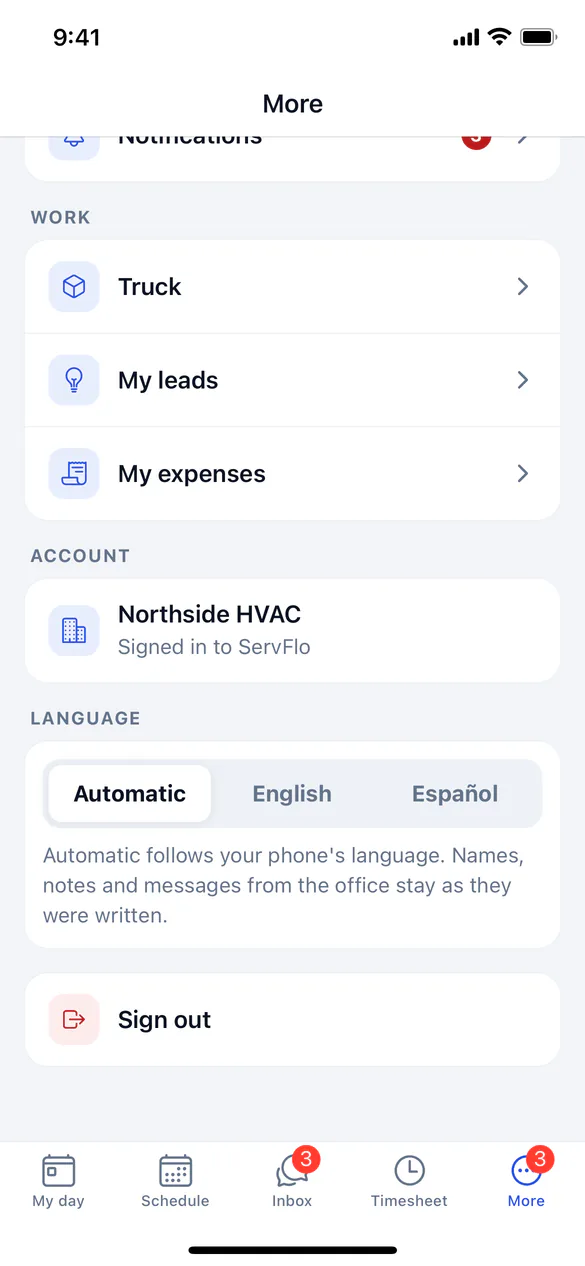
The choice is kept on this phone, even after you sign out. Each person sets their own.
What changes and what doesn't
- Screens, dates, times and amounts follow your language. Notifications about your schedule and parts do too.
- Anything people typed stays as written: customer names, notes, job and service names, pricebook items, form questions and chat messages.
- Some messages from ServFlo (such as why an action was refused, or sign-in errors) are in English.
- Quote option names and membership wording you show the customer on the phone follow the app's language.