
Mobile app
My day
See today's and tomorrow's stops, clock in, map your route and check your schedule for the next two weeks.
My day is the first tab in ServFlo Tech. It shows every stop you're on the crew of for today and tomorrow, in the order the office planned, and keeps them on your phone so they open without signal.
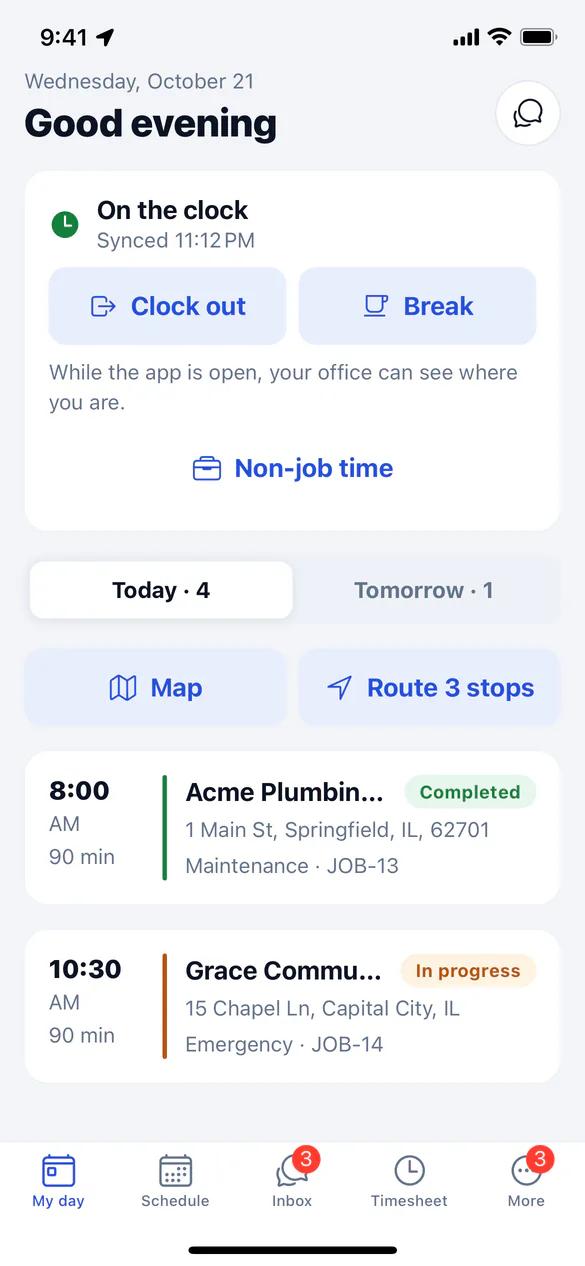
What you see
- The clock: whether you're On the clock, On a break or Off the clock, with Clock in, Break and Non-job time buttons. See Track your time.
- Today · 4 and Tomorrow · 3: switch between the two days. Each stop shows its time, how long it should take, the customer, the address, the service and job number. Members are marked Member.
- Map: today's stops as numbered pins on a map, coloured by status. Tap a pin for Directions or Open job. Stops without a map location are counted but not shown.
- Route 3 stops: opens your remaining stops for today as one route in your maps app.
- Banners when something is waiting to send, when the phone is offline, or when ServFlo refused something you did (tap it to see why).
Tap a stop to open the job. See Work a job.
Pull down on My day to sync now. New jobs the office books show up here, and you get a notification within seconds when one of your jobs is booked, moved, reassigned or cancelled.
Your schedule for the next two weeks
The Schedule tab lists your jobs for the next 14 days. It needs signal; today and tomorrow are always in My day.
Jobs further ahead open in full from the day before, once they're saved on the phone.