
Office mode
Owners, admins and dispatchers get the team's day, the Inbox and customers in ServFlo Tech.
When an owner, admin or dispatcher signs in to ServFlo Tech, the app opens in office mode with the Today, Team, Inbox, Customers and More tabs. What you can do follows your role. Office screens need signal.
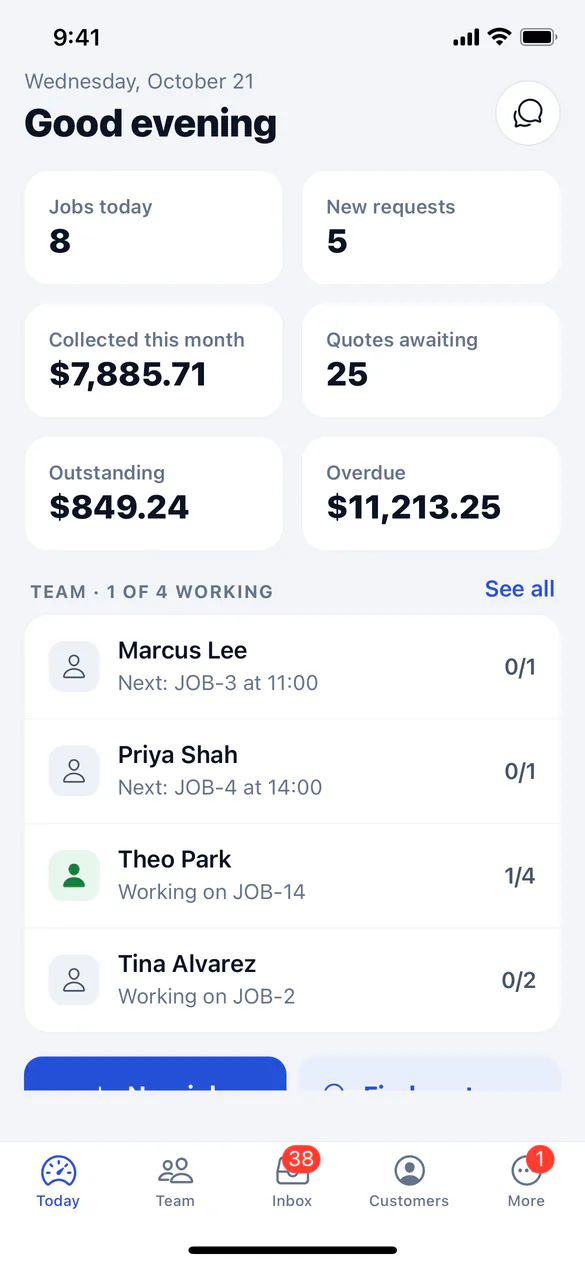
Today
The day at a glance: Jobs today, New requests, Collected this month, Quotes awaiting, Outstanding and Overdue, and who on the team is working and on what. Tap New job or Find customer.
If you also work jobs yourself, tap My day to open your own stops.
Team
Today's or tomorrow's visits by technician, with live status, and what Needs a technician. Tap Team map to see the visits in each technician's colour and where people are now. Tap a visit to call the customer, get directions, reassign it or move it. The technicians' phones are told.
Inbox
- Messages: texts, emails, calls, requests, reviews and website chats, with Everything or Mine.
- To do: new requests (call, Start a quote or Archive), parts requests (mark On order, Ready for pickup or Done) and this week's submitted timesheets to approve or send back.
Website chats open in full. Tap Take over to answer yourself, or Let AI answer to hand it back.
Customers
Search for a customer to call, text, email or get directions, and see their properties, recent jobs, quotes and invoices. Open invoices and quotes can be shared through your phone's share sheet. Customer 360 shows their health score, lifetime value, balance, when service is due and Recent activity. Tap New job to book one.
Under More, Customer texts has your business's text conversations.