
Register for texting (A2P 10DLC)
Register your business with US carriers so your texts reach customers.
US carriers block texts from local business numbers until the business registers. This is called A2P 10DLC registration. ServFlo fills in most of it for you and submits it through Twilio; carriers then review your brand (your business) and your campaign (how you text customers).
Until it's approved, customers can still text you and you'll see their texts, but your texts can't go out. Settings → Messaging → Overview shows the state under Setup status.
Before you start
- You need a texting number. See Set up texting.
- Have your EIN letter from the IRS (CP 575 or 147C) handy if your business has an EIN.
- Your website, privacy policy and terms should be live. If you use a ServFlo website, publish it first: carriers check that your booking page shows the optional texting consent checkbox.
Register
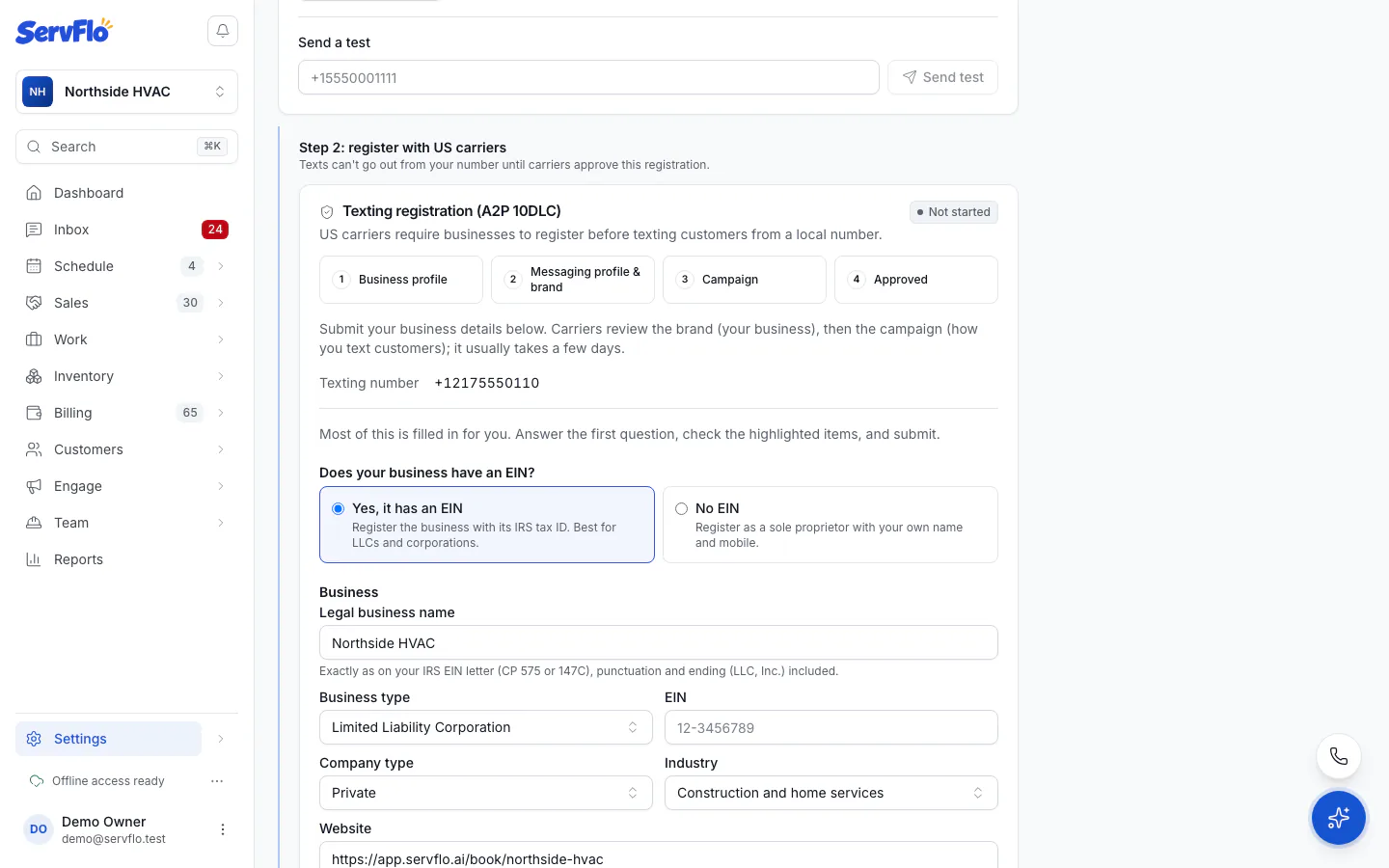
Go to Settings → Messaging → Texting and find Step 2: register with US carriers.
Answer Does your business have an EIN?
- Yes, it has an EIN: register the business with its IRS tax ID. Best for LLCs and corporations.
- No EIN: register as a sole proprietor with your own name and mobile.
Check the prefilled details:
- Business: Legal business name exactly as on your EIN letter, punctuation and ending (LLC, Inc.) included; EIN; Company type; Industry; Website; and your address (no PO boxes).
- Authorized representative: the person carriers can contact. Use a real US mobile.
Optionally open Review what we'll submit (pre-written for you) to see the campaign: What you text about, Campaign description, How customers opt in, Sample messages, Privacy policy and Terms and conditions. ServFlo wrote it from your booking page, privacy policy and terms so it matches what reviewers check. Use our text restores it if you change it.
Look at Before you submit. Fix anything under Needs fixing; Advice items don't block you.
Click Submit registration and confirm.
Submitting sends your business details to Twilio and the US carriers. Registration fees are billed with your ServFlo subscription at Twilio's cost plus 20%, and a refused campaign that you resubmit is charged its review fee again.
Sole proprietors: confirm from your mobile
After carriers approve a sole-proprietor registration, Twilio texts your mobile from +1 (915) 278-2000. Reply YES within 24 hours. The status shows Waiting for your reply until you do; Send the text again resends it.
A sole-proprietor registration allows one texting number and a lower daily volume set by the carriers. It's plenty for appointment reminders, but it means no personal numbers.
Track the review
The Registration steps show where you are: Business profile, Messaging profile & brand, Campaign, Approved. The status updates by itself; Check status now checks right away.
| Status | What it means |
|---|---|
| Not started | Nothing submitted yet. |
| Profile submitted | Your business profile is in. Carriers review your brand next. |
| Brand in review | Usually 1–3 business days. |
| Waiting for your reply | Sole proprietors: reply YES to the text on your mobile. |
| Brand approved | Your campaign is being submitted. |
| Campaign in review | Can take several business days. |
| Approved | Texts go out to customers from your ServFlo number. |
| Failed | Carriers refused it. See below. |
If it's refused
Open Settings → Messaging → Texting. Why it was refused lists each reason in plain English, and the step that failed is marked.
The form reopens with what you submitted and the fields to fix highlighted.
Correct them and click Submit again.
Common fixes: the legal name or EIN doesn't match the IRS record exactly, the website or privacy policy doesn't open, or the opt-in description doesn't mention your booking page and STOP.