
Send from your own domain
Send ServFlo emails from an address at your business's domain, like office@yourbusiness.com.
ServFlo email works straight away from ServFlo's shared sending address. Adding your own domain lets customers see an address at your business's domain instead, which looks more professional and helps emails reach inboxes. It's optional, and emails keep going from the ServFlo address until your domain is verified.
Add your domain
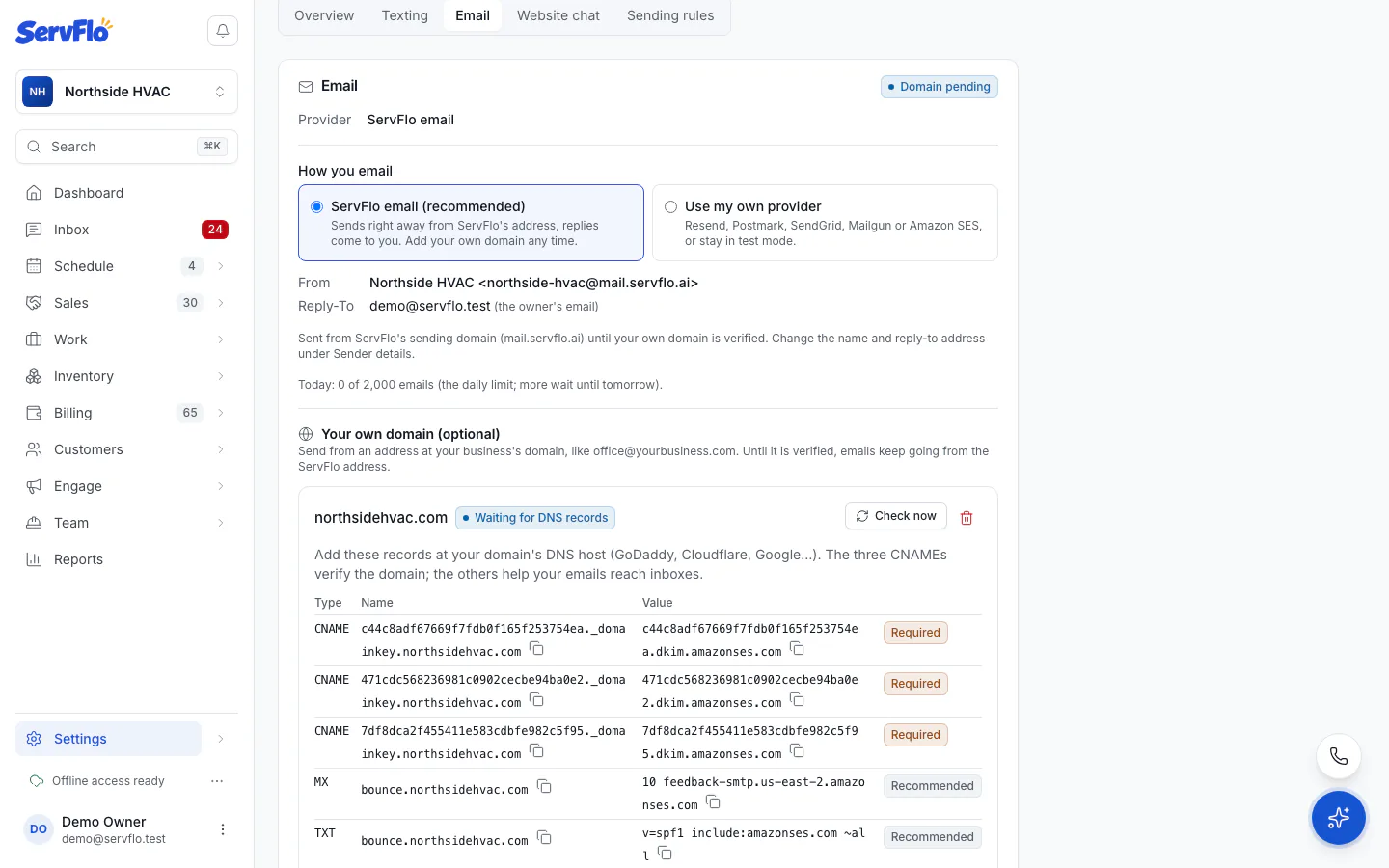
Go to Settings → Messaging → Email and find Your own domain (optional).
Enter Your domain (for example, yourbusiness.com) and click Add domain.
ServFlo shows the DNS records to add. Use Copy name and Copy value for each one.
Add the records at your domain's DNS host (GoDaddy, Cloudflare, Google…):
| Record | Type | Needed | Why |
|---|---|---|---|
| Three DKIM records | CNAME | Required | Verify that you own the domain. |
| Bounce handling | MX | Recommended | Helps your emails reach inboxes. |
| Bounce SPF | TXT | Recommended | Helps your emails reach inboxes. |
| DMARC | TXT | Recommended | Skip it if your domain already has one. |
Some DNS hosts add your domain to the name for you. If so, enter only the part before it.
Back in ServFlo, click Check now, or wait: ServFlo checks again by itself and shows when.
When the domain shows Verified, choose the address to send from under Send from (for example, office) and click Save address.
If your domain is also your ServFlo website's domain, add these records at the same DNS host where you added the website's records.
Domain statuses
| Status | What it means |
|---|---|
| Waiting for DNS records | ServFlo hasn't found the records yet. Emails go from the ServFlo address meanwhile. |
| Verified | Emails go from your domain. |
| Verification failed | The records weren't found in time, or were removed. Emails go from the ServFlo address. Remove the domain and add it again to retry. |
Remove your domain
Click Remove your domain (for example, Remove yourbusiness.com) and confirm with Remove domain. Emails go from the ServFlo address again, and you can delete the DNS records.