
Recording, transcripts and summaries
Record calls with the right consent announcement, read transcripts and get a short AI summary of each call.
Call recording is off until you turn it on. Voicemails are always transcribed.
Turn on recording
Recording and transcription minutes are billed as phone usage. Check your state's recording consent laws before turning off the announcement.
Go to Settings → Phone and scroll to Recording and consent.
Turn on Record calls.
Leave Announce recording on so callers hear the announcement before the call connects. You can edit the Announcement text.
Enter your Business state as two letters (for example TX). It's used for the consent rule below.
Set Keep recordings for (days). Recordings and transcripts are deleted after this (90 days for new businesses).
Turn on Transcribe calls for a written transcript of each recorded call.
Turn on AI call summaries for a short summary of each call. Summaries use AI credits.
Save your changes.
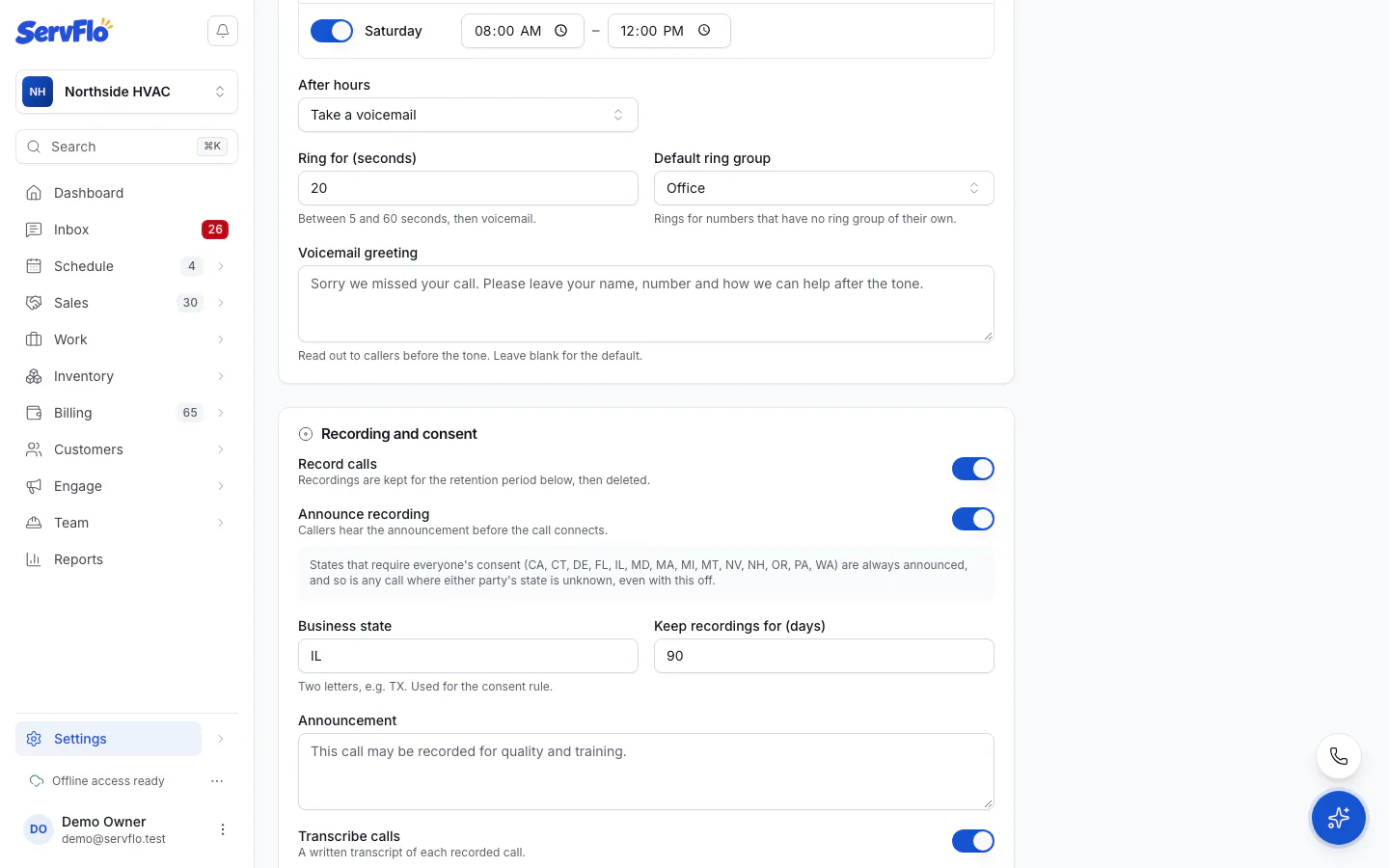
The consent rule
Some US states require everyone on a call to consent to recording. ServFlo always plays the announcement when either party is in one of those states (CA, CT, DE, FL, IL, MD, MA, MI, MT, NV, NH, OR, PA, WA), or when either party's state is unknown, even if you turned Announce recording off. Turning the announcement off only takes effect for calls between two known one-party-consent states. The panel tells you which applies to you.
Recorded outbound calls play the announcement to the customer when they pick up.
Listen to a recording
Recordings and full transcripts are visible to owners and admins only.
Go to Sales → Calls and open the call.
Under Recording (or Voicemail), click Play recording. You can also Download it. The link works for ten minutes.
AI summaries
Each summary is three to five lines: why the customer called, what was agreed and any follow-up. It appears on the call and on the customer's timeline. Everyone who can read the call log can read summaries, without the full transcript.
To regenerate a summary, open the call and click Write again under AI summary. If you're out of AI credits, calls get no summary.
Delete a recording
Open the call and click Delete recording, then confirm.
Related
- The call log
- Phone usage and billing: recording and transcription minutes are billed as usage