
Change a job's status
What each job status means, what moves a job between them, and how to change one by hand.
Every job and every visit has one of five statuses. They show as colored badges across ServFlo: on the jobs list, the job page, the calendar and the dispatch board.
| Status | Meaning |
|---|---|
| Scheduled | Booked for a date. Every new job starts here. |
| Confirmed | You've confirmed the time with the customer. |
| In progress | A technician has started the work. |
| Completed | The work is done. |
| Cancelled | The job won't go ahead. |
Where technicians are
While a visit is under way, ServFlo also shows where the technician is. These aren't separate statuses, but you'll see them on the job, calendar and dispatch board:
- On the way — the technician tapped On my way.
- Arrived (shown to technicians as On site) — they tapped Arrived.
- In progress — they tapped Start job, which also sets the status to In progress.
What moves a job between statuses
- Start job (technician on the job or in My day) → In progress.
- Complete → Completed. This opens the completion steps: Forms, Photos, Signature and Notes, then Complete job.
- A job with several visits stays open until its last open visit is completed. See Add visits and assign crews.
- Completing a recurring job books the next one. See Set up a recurring job.
- Confirming an online booking creates the job for the booked time.
Change the status by hand
Open the job
Go to Work → Jobs and open the job.
Pick the new status
In the Status panel, select the status you want. You can jump from any status to any other in one click. Steps already passed are ticked, and Cancelled sits apart at the bottom.
You can also change it under Edit → Status.
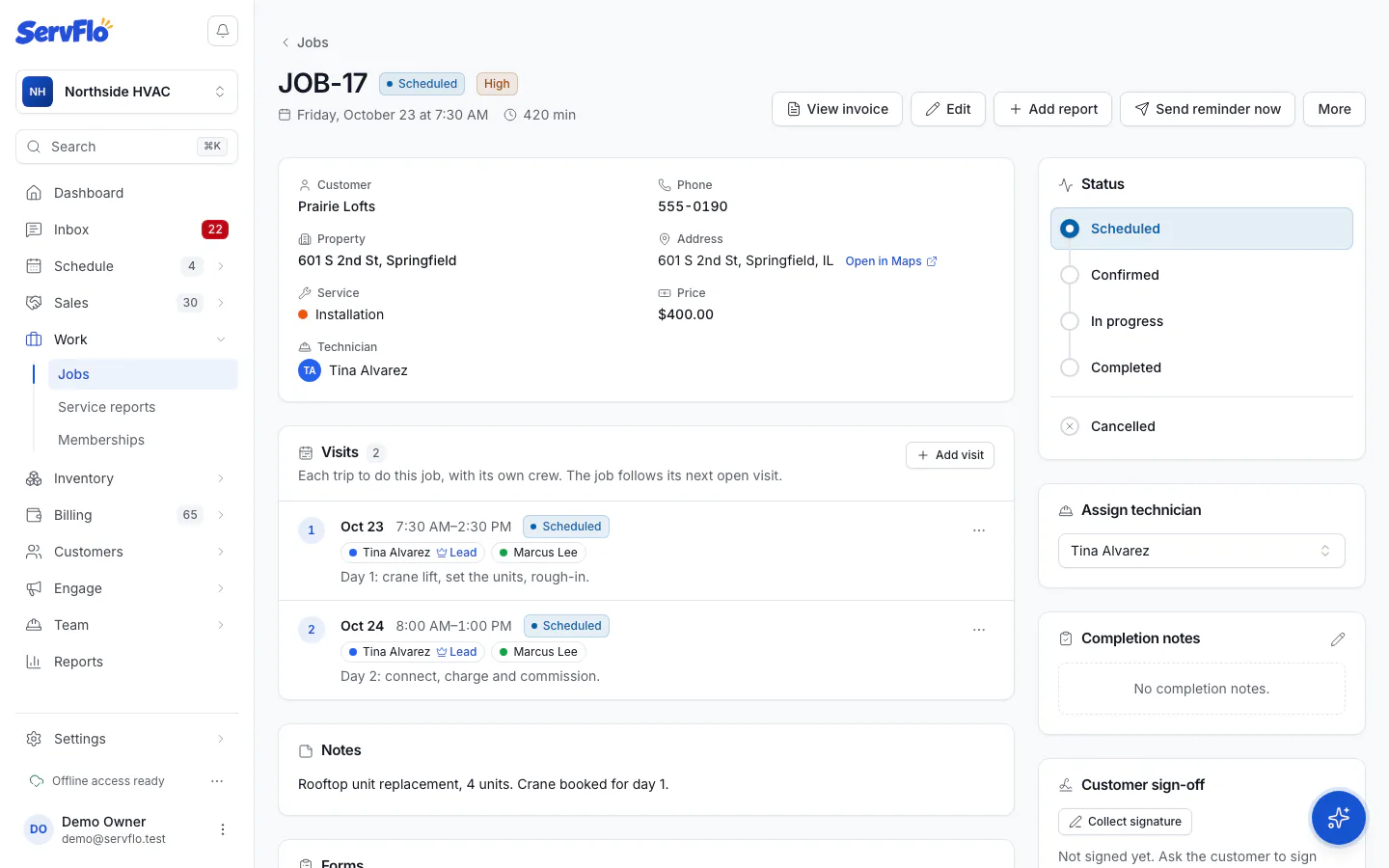
What happens on jobs with several visits
- Scheduled, Confirmed or In progress apply to the visit the job is following.
- Completed closes the whole job: the current visit is completed and any other open visits are canceled.
- Cancelled cancels every open visit.
A job can't be completed while one of its forms is missing a required answer, however you complete it. ServFlo tells you which answers are missing. See Set up job forms.
Who can change a status
Owners, admins, dispatchers and technicians (on their own jobs) can change statuses. Other team members see the status but can't change it.
If a visit is left In progress from a past day, the calendar and My day flag it as Still open from that date, so someone can finish or fix it.