
Choose your notifications
Pick which ServFlo notifications you get in the app, by email and on your phone, and turn on text alerts.
Your notification settings are your own. Changing them doesn't affect anyone else on your team.
Open Notifications
Open the user menu (your name or picture) and choose Account settings. Then select the Notifications tab.
Switch each notification on or off
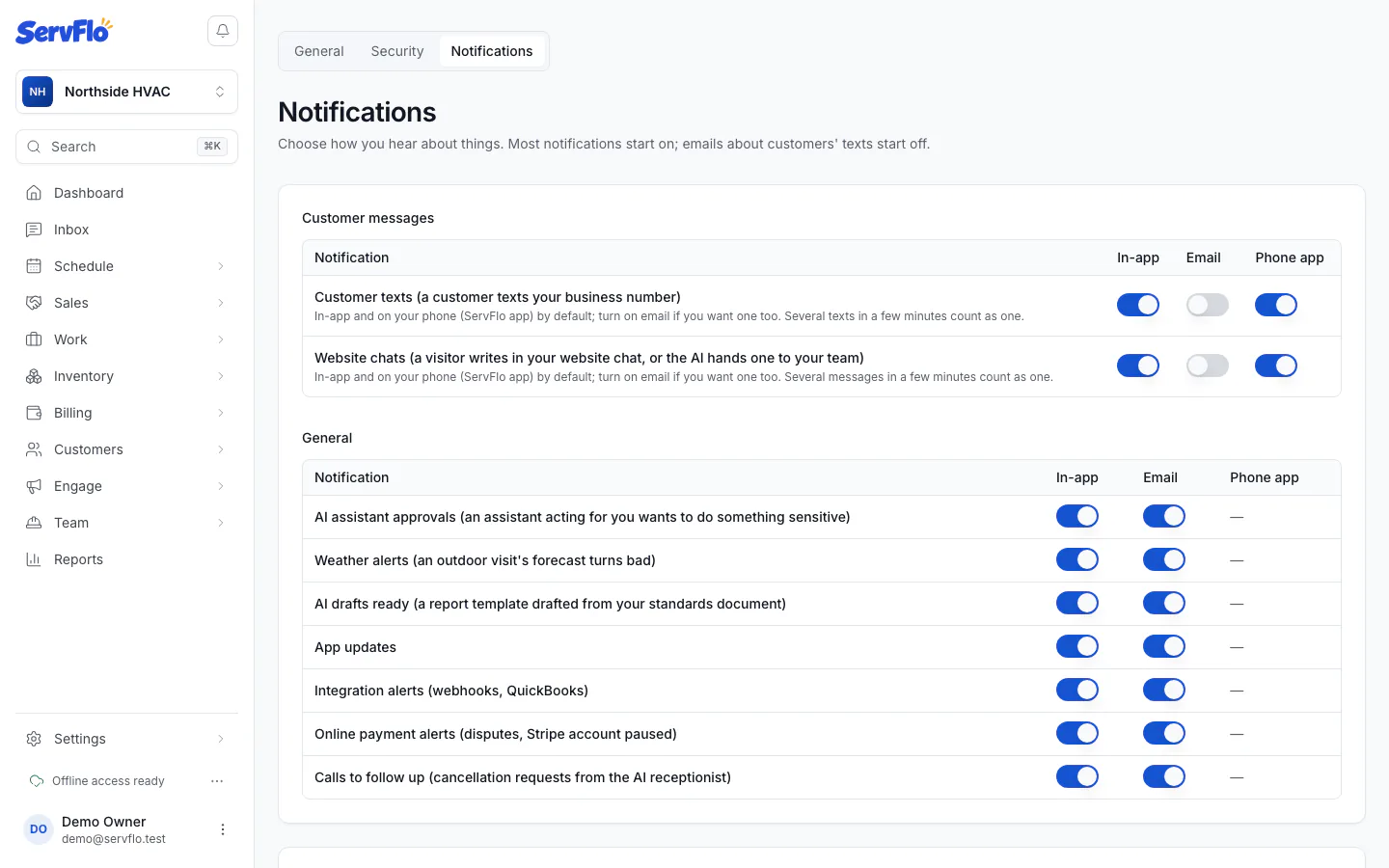
Each notification has a switch for In-app, Email and Phone app (the ServFlo mobile app). Changes save right away.
Most notifications start on. Emails about customers' texts and website chats start off.
What you can turn on or off
Customer messages
- Customer texts: a customer texts your business number. Several texts in a few minutes count as one notification.
- Website chats: a visitor writes in your website chat, or the AI hands a chat to your team.
These two are the only notifications that can go to the phone app. Other notifications show a dash in the Phone app column.
General
- AI assistant approvals: an assistant acting for you wants to do something sensitive.
- Weather alerts: the forecast for an outdoor visit turns bad.
- AI drafts ready: for example, a report template drafted from your standards document.
- App updates
- Integration alerts: webhooks and QuickBooks.
- Online payment alerts: disputes, or your Stripe account is paused.
- Calls to follow up: cancellation requests taken by the AI receptionist.
Text alerts from ServFlo
ServFlo can text your mobile from its own number.
- Under Text alerts from ServFlo, enter your Mobile number. It must be a US mobile number.
- Turn on Text me ServFlo alerts. The text under the switch explains what you're agreeing to.
- Choose which alerts you want:
- Jobs assigned to me (and cancelled)
- Account, billing and integration alerts
- Customers' texts to the business, which is off unless you turn it on
- Select Save.
To stop text alerts, turn off Text me ServFlo alerts and select Save. You can also reply STOP to any alert. If you replied STOP before, turn alerts on again to opt back in.