
Choose your plan
Start your free trial with no card, or pick a plan and start paying now, right after you set up your business.
After you name your business, the owner sees Choose your plan once. Your 14-day free trial of Grow has already started. Other people on your team never see this screen.
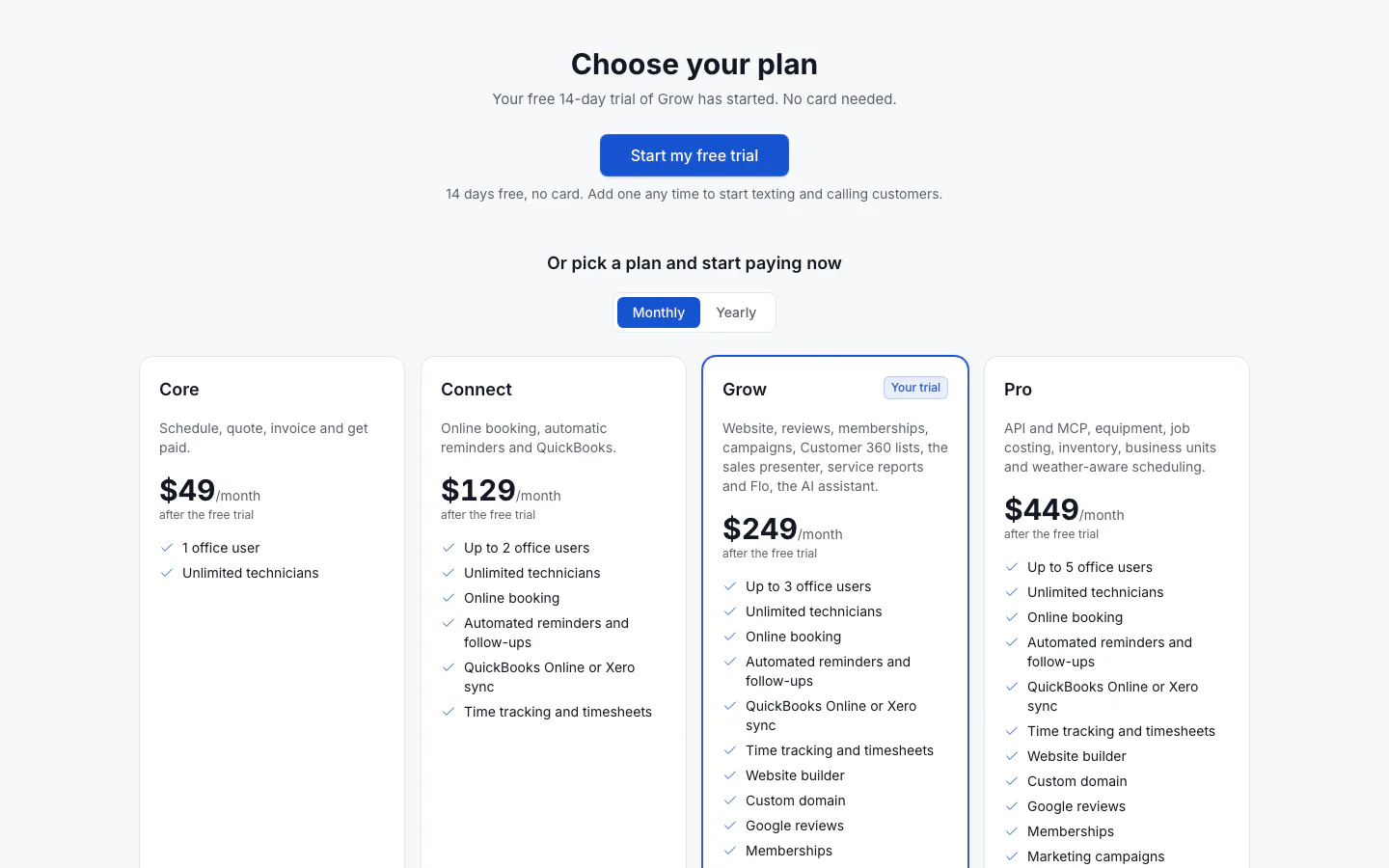
Start the free trial
Select Start my free trial. No card is needed and nothing is charged. You go straight to your dashboard. Follow the first steps to get set up.
You can add a card any time to start texting and calling customers. Adding a card doesn't end the trial.
Pick a plan and start paying now
Under Or pick a plan and start paying now, each card shows what the plan includes and its price after the free trial. The plan your trial is on is marked Your trial. Choose Monthly or Yearly, then select Pick this plan on the plan you want.
- No card on file yet: a secure payment page opens where you enter your card. You then come back to Settings → Billing, which shows your new plan.
- A card already on file: ServFlo asks you to confirm the amount first. For Grow monthly, select Pay $249 and start.
Picking a plan ends the free trial and charges your card today. To keep trying ServFlo for free, select Start my free trial instead.
For the details of each plan, see Choose a plan when you sign up and Compare plans.
You can change or cancel your plan later in Settings → Billing. Only the owner can change the plan or the card.