
Mark outdoor work
Choose which service types plan around the weather, set their rain, wind and temperature limits, and override it per job.
ServFlo already marks likely outdoor work for you, based on your trade and service names (roof, gutter, lawn, deck, exterior painting and so on). Names with "interior", "indoor" or "inside" stay indoor. You can change any of it.
Set a service type as outdoor work
Open Service types
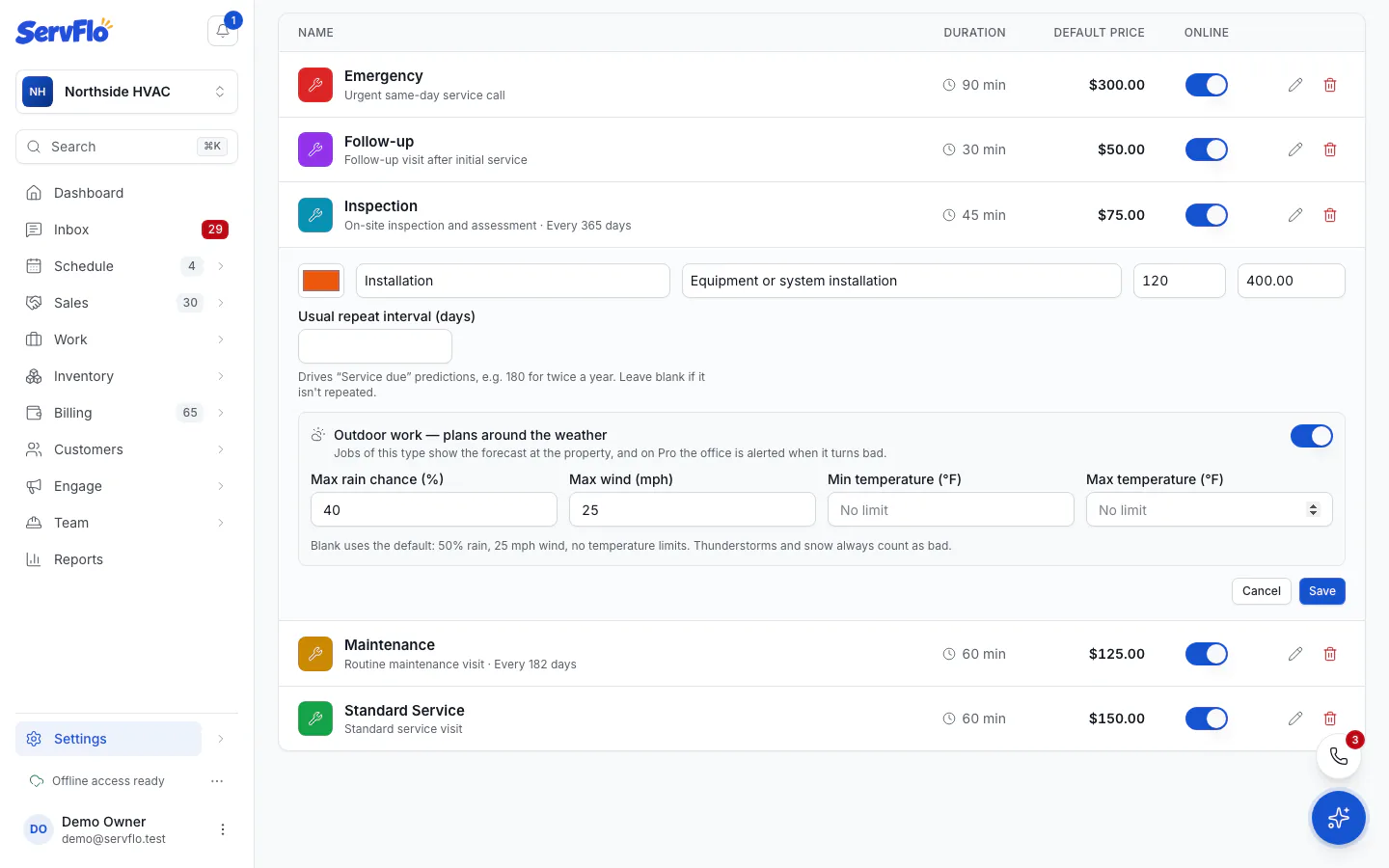
Go to Settings → Service types and open the service type.
Turn on outdoor work
Turn on Outdoor work — plans around the weather. Outdoor service types show an Outdoor badge in the list.
Set the limits (optional)
Fill in any of Max rain chance (%), Max wind, Min temperature and Max temperature. Leave a box blank to use the default: 50% rain, 25 mph wind and no temperature limits. Thunderstorms and snow always count as bad.
Save
Save the service type. Its jobs now show the forecast.
Override it on one job
On the new or edit job form, the Weather setting decides for that job:
- Follow service type (the default)
- Always check the weather
- Never check the weather