
Webhooks
Get signed events from ServFlo when jobs, invoices, payments and more change, and verify them in your code.
A webhook sends an event to your server the moment something happens in ServFlo: a customer is created, a job is completed, an invoice is paid. Use webhooks instead of asking the API for changes over and over.
Add an endpoint
Owners and admins manage webhooks.
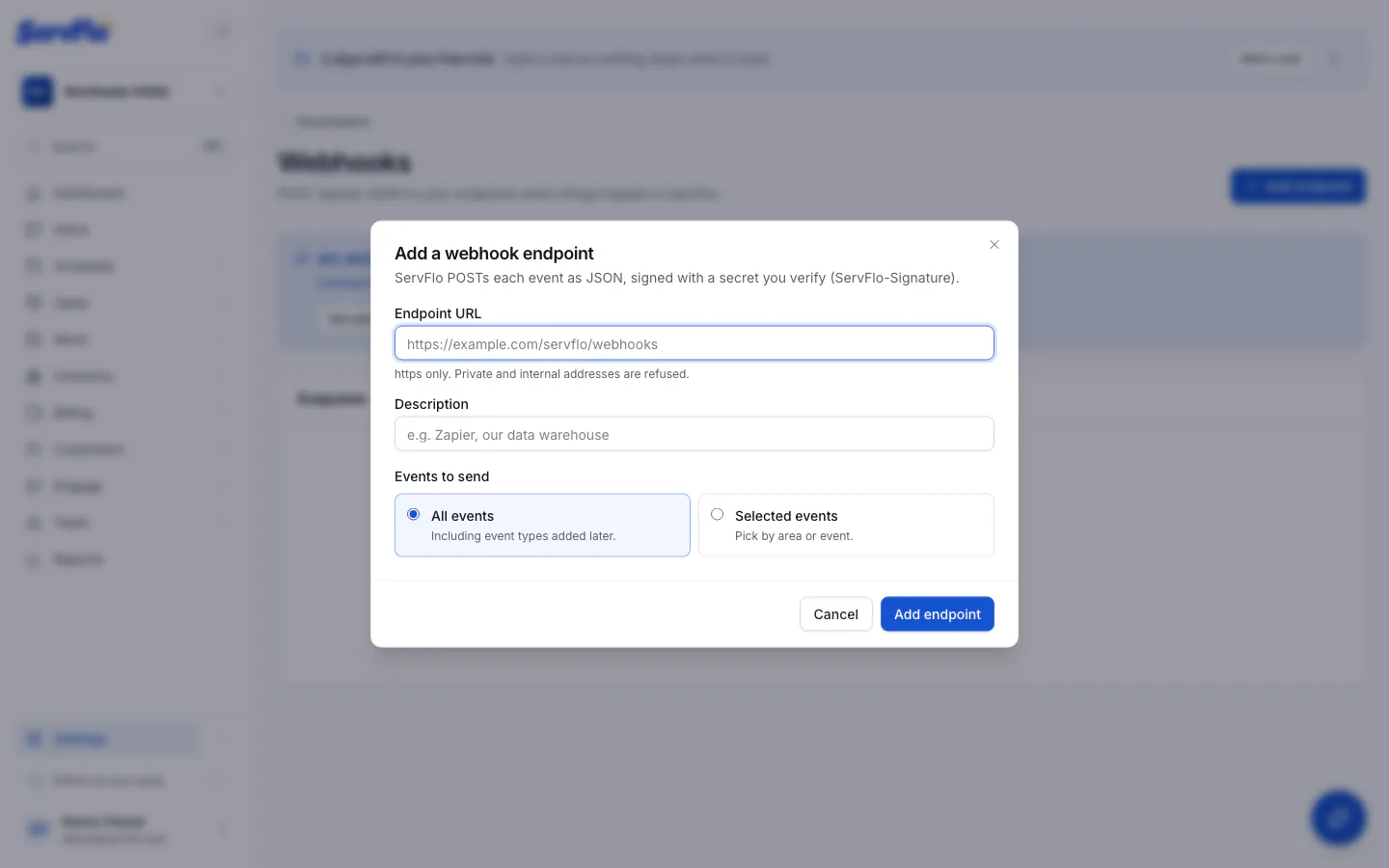
Enter your URL
Under Endpoint URL, enter your server's address. It must be https; private and internal
addresses are refused. Add a Description so you know what it's for.
Choose the events
Pick All events (including event types added later) or Selected events, chosen by area or one by one. See the Event catalog.
Save the signing secret
Click Add endpoint. Copy the signing secret (it starts with whsec_) and click I've
saved it. It's shown only once; you need it to check that events really come from ServFlo.
Send a test
On the endpoint's page, click Send test event. ServFlo sends a webhook.test event at once
and shows your server's answer.
A business can have up to 20 endpoints. You can also manage them through the API (Webhooks API); adding or changing an endpoint with an API key waits for your approval.
What ServFlo sends
Each event is a POST with a JSON body and these headers:
| Header | Value |
|---|---|
Content-Type | application/json |
User-Agent | ServFlo-Webhooks/1.0 |
ServFlo-Event-Id | The event's id. The same event always has the same id. |
ServFlo-Event-Type | The event type, such as invoice.paid. |
ServFlo-Signature | t=<unix seconds>,v1=<signature>: see Verify the signature. |
The event body
{
	"id": "…",
	"type": "invoice.paid",
	"occurredAt": "2026-11-03T15:04:05.000Z",
	"organizationId": "…",
	"data": {
		"recordId": "…",
		"identifier": "INV-40"
	}
}| Field | Meaning |
|---|---|
id | The event's id. |
type | The event type. The part before the dot is the record type (invoice.paid → an invoice). |
occurredAt | When it happened, ISO 8601 in UTC. |
organizationId | Your business's id. |
data | The event's details: always recordId, often identifier, and the fields in the Event catalog. |
Event data holds ids, statuses, amounts (in cents) and dates only, never names, addresses,
notes or costs. To get the full record, call the API with data.recordId.
Answer quickly
Answer with any 2xx status within 10 seconds. Anything else, or no answer in time, counts
as a failure. Do the real work after you answer (put the event on a queue), so slow work doesn't
cause retries.
Retries
A failed delivery is tried again after 1 minute, 5 minutes, 30 minutes, 2 hours and 12 hours: six attempts in all. After the last one it is marked Failed.
- If 5 deliveries in a row fail every attempt, ServFlo turns the endpoint off and notifies the person who added it. Fix your server, click Turn on, then Resend the failed deliveries.
- On the endpoint's page, Deliveries shows every attempt with your server's status code, answer and timing. Resend sends any delivery again now.
- Events are never lost while an endpoint is off or failing: they stay in the Event log in Settings → Developers, where you can see each event's data and where it was delivered.
Handle duplicates and order
The same event can arrive more than once (a retry after a slow answer, or a resend). Use the
ServFlo-Event-Id header to skip events you've already handled. Events can also arrive out of
order; use occurredAt, or read the record from the API, when order matters.
Verify the signature
Every delivery is signed with your endpoint's secret, so you can tell it came from ServFlo and
wasn't changed. The ServFlo-Signature header looks like this:
ServFlo-Signature: t=1793804645,v1=5257a869e7ecebeda32affa62cdca3fa51cad7e77a0e56ff536d0ce8e108d8bdTo check it:
- Read
t(the time it was signed, in Unix seconds) and thev1value from the header. - Compute an HMAC-SHA256 of the string
"<t>.<raw body>"with your signing secret, as hex. - Compare it with
v1using a constant-time comparison. - Refuse it if
tis more than 5 minutes from your clock (it could be a replay).
Use the raw body exactly as received. Parsing the JSON and turning it back into text changes the bytes and breaks the signature.
import { createHmac, timingSafeEqual } from "node:crypto";
import express from "express";

const secret = process.env.SERVFLO_WEBHOOK_SECRET; // whsec_…

function verifyServFloSignature(header, rawBody, toleranceSeconds = 300) {
	if (!header) return false;
	let timestamp = NaN;
	const signatures = [];
	for (const part of header.split(",")) {
		const [key, value] = part.trim().split("=", 2);
		if (key === "t") timestamp = Number(value);
		else if (key === "v1" && value) signatures.push(value);
	}
	if (!Number.isFinite(timestamp) || signatures.length === 0) return false;
	if (Math.abs(Date.now() / 1000 - timestamp) > toleranceSeconds) return false;

	const expected = Buffer.from(
		createHmac("sha256", secret).update(`${timestamp}.${rawBody}`).digest("hex"),
		"hex",
	);
	return signatures.some((signature) => {
		const given = Buffer.from(signature, "hex");
		return given.length === expected.length && timingSafeEqual(given, expected);
	});
}

const app = express();

// express.raw keeps the body as bytes, exactly as ServFlo sent it.
app.post("/servflo/webhooks", express.raw({ type: "application/json" }), (req, res) => {
	const rawBody = req.body.toString("utf8");

	if (!verifyServFloSignature(req.get("ServFlo-Signature"), rawBody)) {
		return res.status(400).send("Bad signature");
	}

	const event = JSON.parse(rawBody);
	res.sendStatus(204); // answer first, then do the work
	handleEvent(event);
});
The header can carry more than one v1 value; accept the delivery if any of them matches.
Rotate the secret
On the endpoint's page, click Regenerate secret. The old secret stops working at once and every delivery from then on is signed with the new one, so update your server straight after.
Turn off or delete an endpoint
- Turn off pauses deliveries; they wait and go out when you turn it back on.
- Delete endpoint removes it and its delivery log. Events stay in the event log.